Free Tool
Finally, an honest assessment of your communication skills, based on your actual meetings.
Annual reviews rely on memory. Personality quizzes rely on guesswork. This tool analyzes the real evidence in your meetings to show you exactly what your role requires, and clear evidence of your skills in action during meetings.
Tap to Enlarge
Free. No login required. All data wiped at session end.
Powered by Evro, the AI meeting assistant that solves communication.
The Problem
You're being evaluated constantly. You're informed rarely.
You might want an honest answer to some simple questions: How do I come across? and Am I as effective as I think I am?
Annual reviews happen once a year. They're shaped by whatever your manager happens to remember, filtered through their comfort in giving direct feedback, and they rarely tell you anything specific about how you communicate day to day.
So you default to guessing but there is always uncertainty about how you're perceived.
How It Works
A real assessment, built from your own meetings, not a personality quiz.
We've removed the friction of finding evidence for your performance. Here is how it works:
- 01
See what your role actually requires.
Tell us your job title, seniority, and industry. We'll instantly generate a custom skill framework showing exactly what top performers in your role do, broken down into clear categories like Structuring Ideas, Meeting Facilitation, and Stakeholder Navigation.
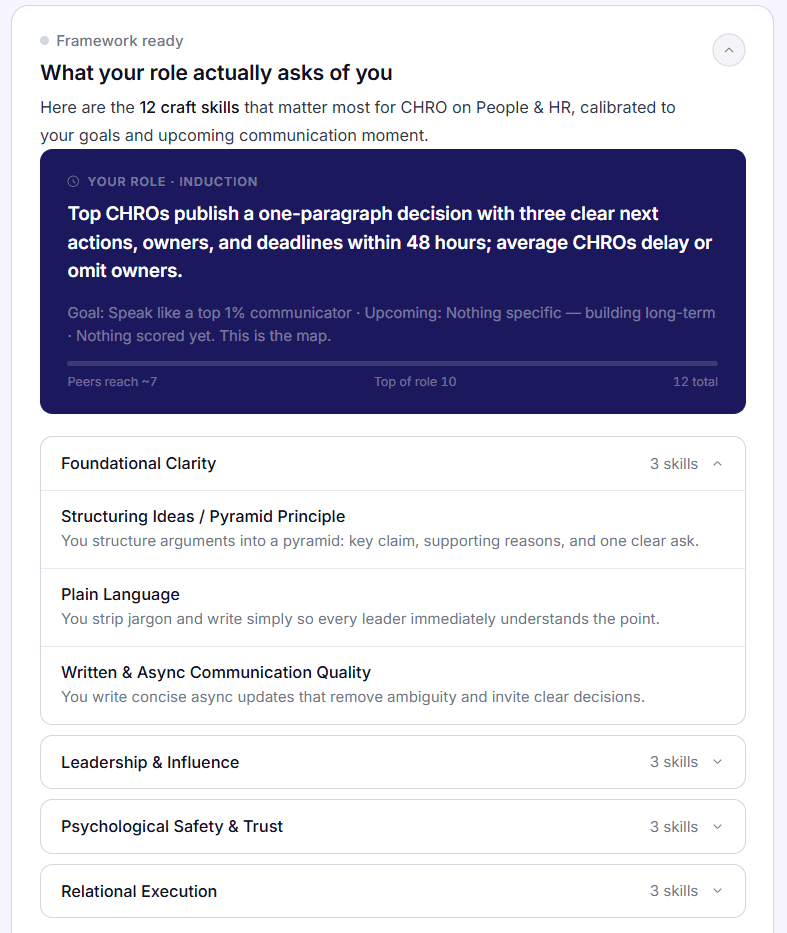
Sample Skill Framework - 02
Test the waters (No risk).
Don't want to hunt down a transcript right now? Use our pre-loaded sample transcript. Run the assessment on a realistic sample meeting to see exactly how the tool works and what your output will look like.
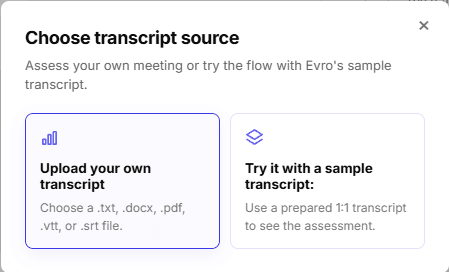
Transcript Upload - 03
Get a private performance review of your communication skills with evidence.
When you're ready, paste or upload a transcript from a recent meeting you've had. We'll analyze which of the expected skills you're displaying, and which ones aren't showing up yet, backed by direct quotes from your own conversation.
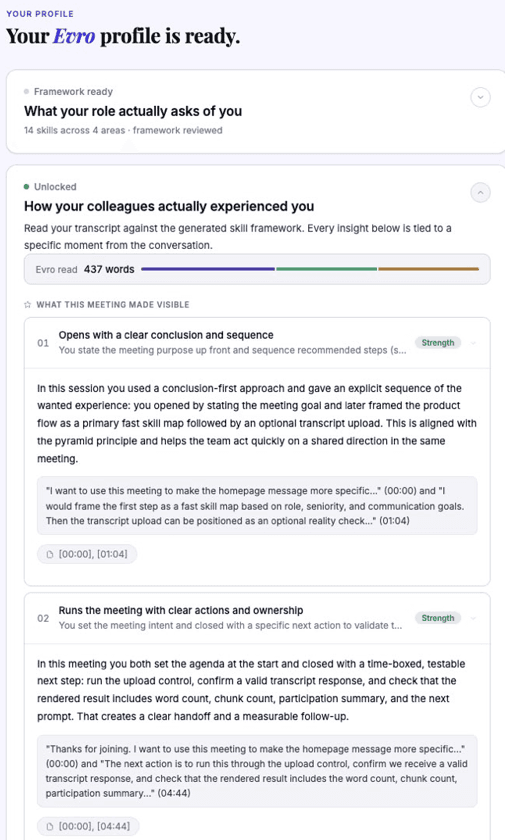
Sample Performance Report
Why This Is Better Than Standard AI
You could ask your own AI. It would just tell you what you want to hear.
Paste a meeting into ChatGPT and ask “how did I do?” it will give a less accurate answer. This tool starts from research, not a guess.
Answers are checked against frameworks.
Every skill it checks you against comes from a fixed framework built on named, cited sources. Not improvised in the moment you ask.
Your role changes the framework, not just the wording.
A Sales Director and an HR Manager get genuinely different skills to be measured against in our system. Ask ChatGPT the same question twice in different roles and you'll get the same advice with different job titles pasted in.
Guardrails are built-in to ensure accuracy.
Most AI tools find something positive to tell you no matter what you show them. This one shows a skill as unproven if your meeting simply didn't give it enough evidence. A fair review includes what it didn't see, not just what it did.
What You Actually Get
Every claim is auditable. Not just an AI opinion.
When you upload your transcript, you don't just get a score. You get a progressive, evidence-based breakdown:
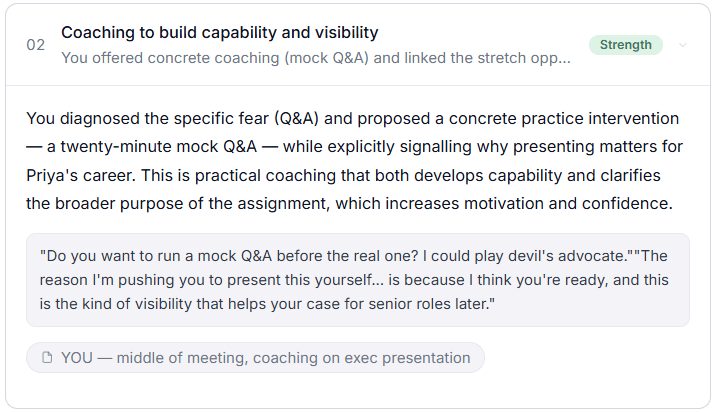
How colleagues experience you
We surface specific behavioral patterns (like “Opens with a clear conclusion and sequence”) backed by direct verbatim quotes and timestamps from your meeting.
Your full skill map
Every required skill is mapped to a clear status. We don't flag “weaknesses” — we simply show you what wasn't observable in that specific conversation.
Trust / Privacy
Your data is never saved. We mean that literally.
We know handing over a meeting transcript is not a small ask. Here's exactly what happens to it:
Everything including your transcript, your role context, and your results, is permanently deleted the moment your session ends. Nothing is retained, nothing is reviewed by a human, and nothing sits on a server. Your transcript is anonymized during processing to generate your assessment.
We only ask for your email when you click the button on this page so we can send you your results and keep you posted on what we're building. Unsubscribe any time, no hard feelings.
Stop guessing. See the real evidence.
Run the assessment on a sample transcript, or jump straight in with your own.
Free. ~ 5 minutes. Your data is wiped when you leave.
FAQ
Yes. All we ask for is your email so we can send you your results and keep you in the loop on what we're building. You can unsubscribe any time.
It is anonymized and used only to generate your assessment. It is deleted immediately after your session ends. We don't store it, and no one reviews it manually.
Yes. You can select a sample transcript inside the tool. This lets you see the full power of the assessment using a realistic pre-loaded meeting, so you know exactly what you'll get before you spend time finding your own transcript.
Evro is an AI meeting assistant that solves communication at work. It has all of the features of a meeting notetaker such as accurate transcription, summaries and actions as well as a suite of additional features to help you communicate like the top 1% for your role.
Google Meet
Prerequisite: Transcription must be started by the host or co-host during the meeting (Activities icon (diamond) > Transcripts > Start transcription). This is available on paid Google Workspace plans.
Where to find it:
- Open Google Drive using the meeting organizer's account.
- Open the "Meet Recordings" folder.
- Look for the file labeled with (Transcript) after the meeting title. It saves automatically as a Google Doc.
Alternative: The host will receive an automated email link to the transcript, and it will automatically attach itself to the original Google Calendar event.
Microsoft Teams
Prerequisite: Transcription or recording must be turned on during the meeting (More > Record and transcribe > Start transcription).
Where to find it:
- Open Teams and navigate to your Calendar or the meeting's Chat history.
- Open the specific meeting entry and click on the Recap tab.
- View the transcript next to the recording, or click the Download arrow to export it as a .docx (Word) or .vtt file.
Alternative: For private meetings, the transcript file is also instantly saved to the organizer's OneDrive under the "Recordings" folder. For channel meetings, it is saved under the Files tab of that specific Teams channel in SharePoint.
Zoom
Prerequisite: You must have a paid Zoom account, record the meeting to the Cloud, and have "Meeting transcript" explicitly turned on in your advanced recording settings before the call.
Where to find it:
- Log into the Zoom Web Portal (zoom.us) via a web browser.
- Click on Recordings in the left-hand navigation menu.
- Under the Cloud Recordings tab, click on the name/topic of your meeting.
- Hover over the Audio transcript file component and click the download button to grab your text file (saved in .vtt or .txt format).